nTimers
Manage multiple times simultaneously
Control multiple timers at once with ease. Perfect for cooking multiple dishes, managing timed games, training sessions, rotations and any activity requiring multiple timers.
Manage multiple times simultaneously
Control multiple timers at once with ease. Perfect for cooking multiple dishes, managing timed games, training sessions, rotations and any activity requiring multiple timers.
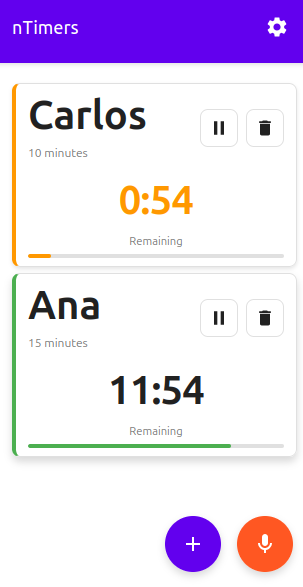
Manage multiple timers simultaneously. Ideal for cooking, training, games and more.
Highlighted red banners show when time is up, with overtime counter.
Add timers using your voice. Say "Pasta 12 minutes" or "Mary 10 minutes" and done.
Full control over each timer. Pause and resume whenever you need.
Progressive Web App that works offline. Install it like a native app.
Intuitive design with large names easy to read from distance.
Press the + button or use voice commands to add a new timer.
Select duration: 10, 20, 30 minutes or customize the time you need.
Timers are sorted by urgency. Expired ones appear in red at the top.
Yes! nTimers is completely free with no ads, no subscriptions, and no hidden costs. Use it as much as you want.
Yes! nTimers is a Progressive Web App (PWA) that works completely offline after your first visit. All your timers will continue to work even without an internet connection.
You can run unlimited timers simultaneously. The app is designed to handle multiple timers efficiently, making it perfect for complex tasks like cooking multi-course meals or managing group activities.
No installation required! Just visit the web app and start using it immediately. However, you can optionally install it to your home screen for quicker access, just like a native app.
Yes! nTimers works on all devices including iPhone, Android, tablets, and desktop computers. It's a web app, so it works in any modern browser.
Yes! You can add timers using voice commands. Simply say names and durations like "Pasta 12 minutes" or "Workout 30 minutes" and the timer will be created automatically.
Manage multiple timers efficiently
Open nTimers Now💡 Tip: You can install the app on your device for quick access